Kategorie:Hilfe
Overview
Kerio Operator doesn't support all Hardware phones. This article provides a step by step instruction on how to auto-provision "not supported" hardware phones.
Environment
You should have at least 2.6.4 (preferably 2.6.5 Beta)
Requirements
Access to Kerio Operator Webadmin.
Process
      1. Modify the attachedsnom-785_original.zip.
      2. Unzip snom-785_original.zip and then modify phone_types and firmware_types files by adding appropriate
         entries.
In this case to add Snom D712 support:
     firmware_types
     fw_712 "snom 712" firmware SCRIPT=fw
     phone_types
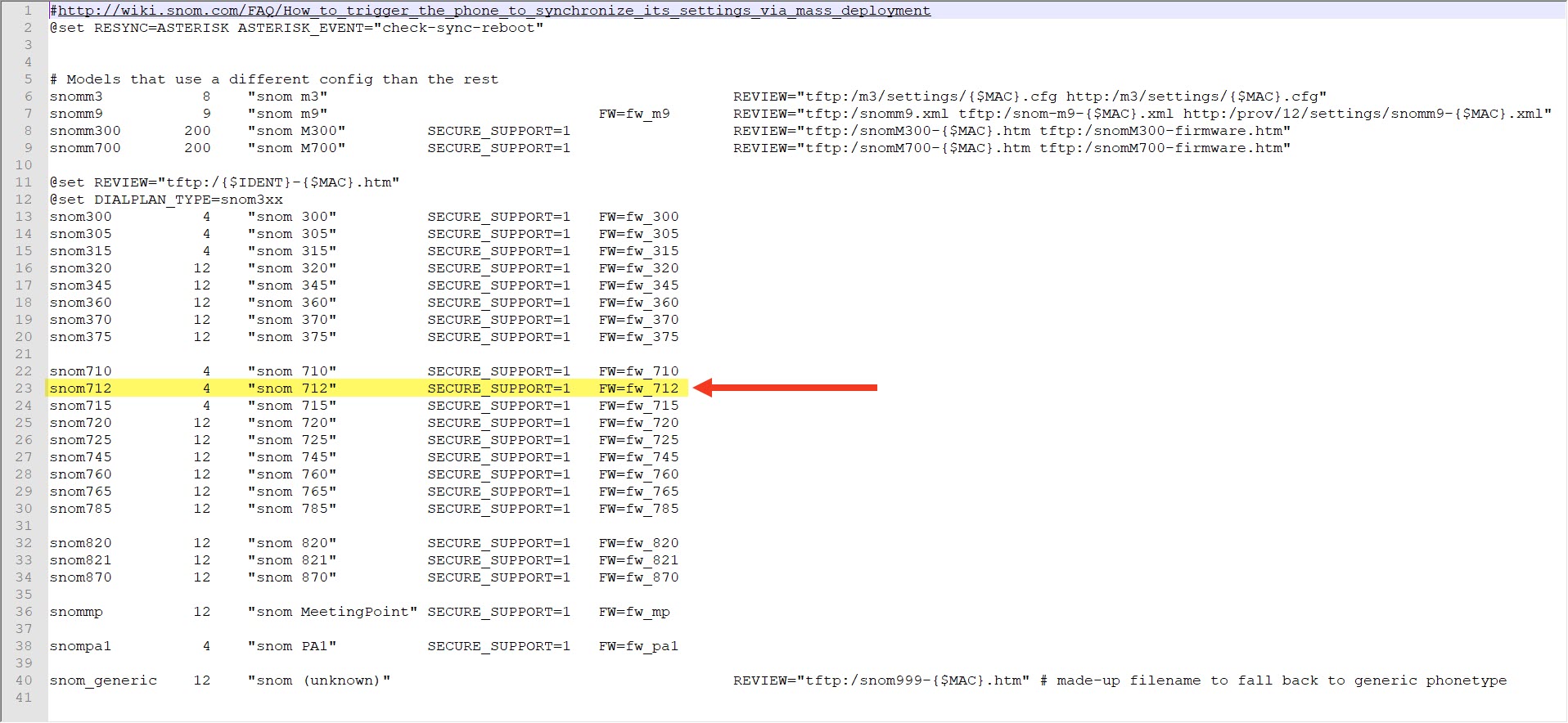
     snom712 4 "snom 712" SECURE_SUPPORT=1 FW=fw_712
     (see attached snom-785_modified.zip)
phone_types file after adding appropriate entries.

firmware_types file after adding appropriate entries.
<img src=https://support.keriooperator.gfi.com/hc/article_attachments/360014244099/002.jpg">
a.In the administration, go to Provisioned Phones;
b.Press the 'Advanced'button;
c.Holding the SHIFT key, press'Provisioning Modules..'.
d.Check the mark"Allow to install unsigned modules";
e.Disable the snom module;
f. Press Upload and select the attached snom-785.zip file.
Confirmation
Not supported phones will be auto-provisioned after this procedure.
snom-785_modified.zip 10 KB Downloaded
snom-785_original.zip 10KB Downloaded